

Maximum hit points, as determined by the Rules as Written, are calculated using the average of a character’s hit die. This can be tough at low levels when a single blow from an enemy — say, a mimic disguised as a chair (sorry Crane) — can end a character’s campaign. Fortunately, many campaigns, including ours, use a common home brew rule that allows players to take the maximum of their hit die each level, instead of the average.
This home brew rule is welcomed but it creates a problem for the D&D Beyond character sheet. The sheet uses the RAW when the player hits the level up button. Additionally, the character sheet uses the RAW after a short or long rest, resetting the character’s maximum hit points using the hit die average.
So leveling up and resting requires some manual intervention to ensure the character sheet matches our campaign rules and your character has the correct number of hit points. Fortunately, there are two easy fixes.
We’ll use Drezek (Level 3 rogue with 12 constitution) as an example.
Using our campaign rules:
Rogue hit die is a d8 and a 12 constitution has a +1 modifier.
So Drezek gets 8 + 1 = 9 hit points per level and would have 27 hit points at level 3.
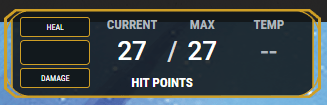
But here’s what happens after a Long Rest:
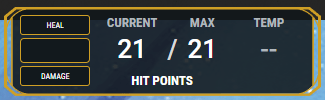
Why the lower max? Because the RAW say so:
Using Rules as Written:
Level 1: 8 + 1 = 9
Level 2: 5 + 1 = 6
Level 3: 5 + 1 = 6
Total: 21
There is both a way to fix this and a way to prevent it in the first place.
To prevent your max hit points from resetting to RAW during a long rest, simple uncheck the “Reset Maximum HP changes during this rest.” box and the character sheet will retain your customized hit point total.

If you forget or the sheet resets your hit points to RAW for any other reason, the fix is equally as simple.
Click anywhere in the Hit Points box to bring up the HP Management window.
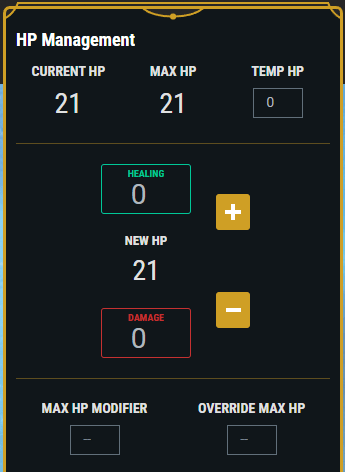
Click the Override Max HP box and enter your correct total. The sheet will update with that total appropriately.
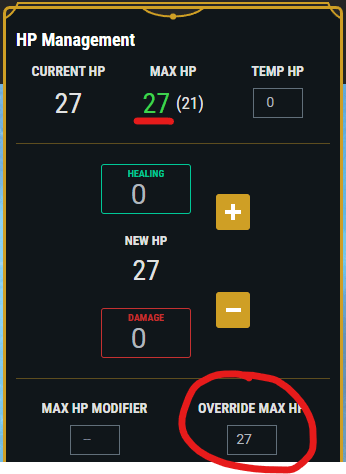
This manual override should be used when leveling up, resting, or any other time the sheet resets your HP to the RAW.
 Curse of Strahd