

For most people, this can be ignored. The character sheet lists every skill in the game, adds your bonuses, and gives you a roll button. DM needs you to roll an Intelligence (Investigation) check? Just click the button and it rolls. The sheet adds your INT bonus and any proficiency or expertise you may have. Simple.
The one place where it’s not straightforward is when the skill check uses a tool. Tools are not skills and, therefore, aren’t listed in the Skills menu. For tool checks that aren’t used frequently, it’s simple to just do it manually. If you need to roll an Intelligence (Herbalism Kit) check (maybe to craft a potion?) you could simply roll an INT check and add your proficiency bonus if, for some reason, you happened to have proficiency in Herbalism Kits.
Again, this won’t be used often…except for one thing: Thieves’ Tools.
If you are picking a lot of locks and disarming a lot of traps, it may be convenient to make a roll button for it instead of manually rolling a dex check and remembering to add your proficiency bonus and your expertise bonus if you have it. Here’s how you make a custom skill roll button:
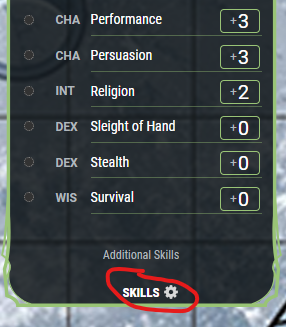
First, at the bottom of the skills list, click the SKILLS cog:
That will open a sidebar. At the bottom, click the down arrow for Custom Skills and then click “+ Add Custom Skill” That will add the skill instantly. But it still needs to be edited.
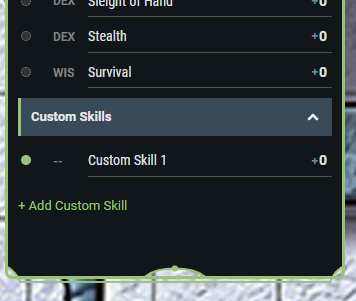
Now, click on the new skill, “Custom Skill 1” and it will open up an editing box.
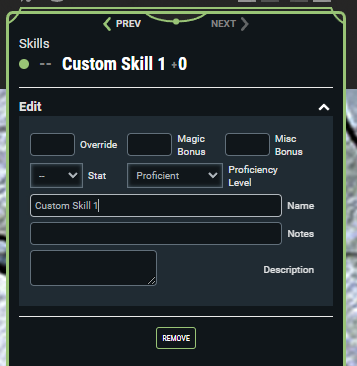
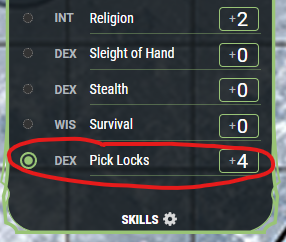
Now you can actually customize the skill. There are three things you’ll want to change at a minimum: Stat, Proficiency, and Name. “Stat” is the ability score that influences the tool and it’s where your bonus will come from. Proficiency Level is whether you have proficiency or expertise with that skill/tool. And name is self explanatory. This is how I set up a “Pick Locks” skill for a character with Expertise in Thieves’ Tools.
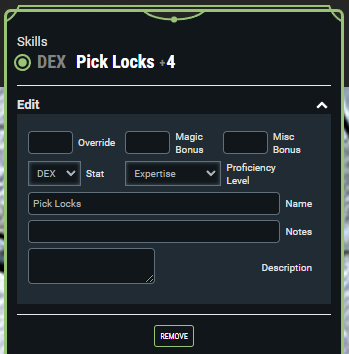
And this is what it looks like in the skills list when it’s done:
Notes:
- I didn’t make a custom skill for “Disable traps” because it’s exactly the same roll. I’ll just click the pick locks button. The better name for this skill is probably “Thieves’ Tools” but I like to see “pick locks” come up in the game log.
- You can select a tool for proficiency (or expertise for some classes) in character creation just like you can a skill. It’s listed in the dropdowns. For example, rogues get Thieves’ Tools proficiency automatically so when you are selecting your two skills for expertise, Thieves’ Tools will be an option.
 Curse of Strahd