

I remember playing DnD as a kid and wearing a hole in my character sheets where I was constantly erasing and rewriting my hit points. As you’d expect, DnD beyond has a great system.
In the upper right section of the character sheet, your calculated hit points are displayed. DnDB does all the work for you, taking into account any bonuses or penalties. But what happens in combat?
If you take damage, simply click in the box (circled below) and type the number of hit points of damage you took. Then click the DAMAGE button below. Your sheet will reduce your “CURRENT” hit points by that much. If you get a heal, enter the amount of healing you received and click the HEAL button. The sheet will add that to your CURRENT hit points up to your displayed MAX hit points. Simple!
But there’s a bit more. If you click on the “–” under temp hit points, you can type in a number of temp hit points. If you then later enter a damage amount in the Heal/Damage box and click DAMAGE, the sheet will first use any temp hit points you have an take the rest from your current
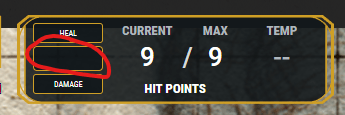
If you want even more control, maybe during a big fight where you’re using the hit point box a lot, you can click in the box and bring up a dedicated hit point sidebar.
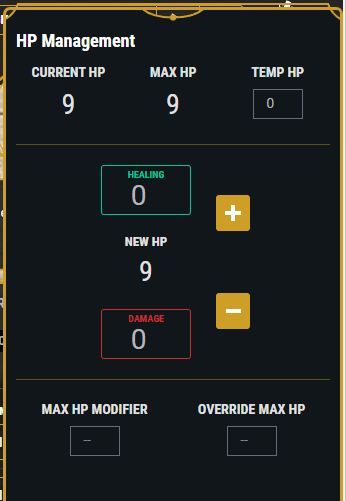
Now you’re all set to take as much damage as your DM is ready to dish out. Have fun!
 Curse of Strahd