

Unlike most DnDBeyond character sheet capabilities, Dual Wielding is a bit clunky. But once it’s set up, it works great. You could simply equip your offhand weapon in the INVENTORY tab just like your main hand but that has two issues.
First, the offhand weapon will show up as an Action but offhand attacks are Bonus Actions. Not a huge deal, but not as clean as it can be. Second, and more importantly, off hand attacks do not get your ability bonus added to damage like main hand attacks do. If you set your offhand weapon up correctly, though, it appears as a bonus action and does not add your ability to damage.

First, equip the weapon in your inventory tab just like any other by clicking the “Active” box next to it. Next, click the weapon you want to be your offhand weapon and a box will appear in the margin. Click the down arrow next to Customize.
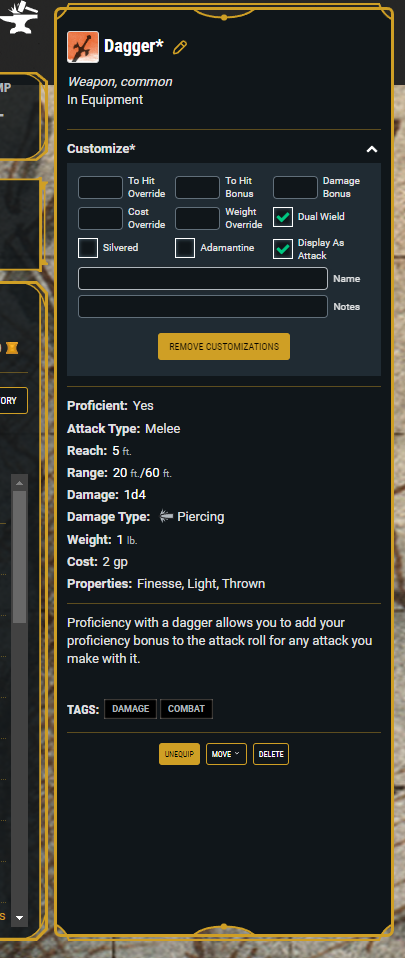
This box has all sorts of cool stuff. You can add bonuses if it’s magic, name it if it’s got a name, etc. But there is also a check box for “Dual Wield.” Checking that will move the weapon’s attack down to the Bonus Action section of your Actions tab and allow you to click it for a bonus action without adding your ability score.
Now you’re all set for dual-wield attacking.
 Curse of Strahd